
In many applications, you might need to run certain tasks automatically at specific times. For example, sending daily emails, cleaning up a database, or generating reports. In Node.js, one of the easiest ways to schedule these tasks is by using the node-cron package.
In this blog post, we will learn what node-cron is, how it works, and see a simple example.
What is node-cron?
node-cron is a Node.js library that allows you to schedule tasks (also called “cron jobs”) to run at specific times or intervals. It uses a cron syntax, which is a common format for defining time-based schedules.
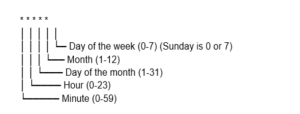
A cron job uses 5 fields to specify its schedule.
Installing node-cron
To use node-cron, you first need to install it in your Node.js project:
npm install node-cron
Basic Example
Here’s a simple example to run a task every minute:
const cron = require('node-cron');

 // Schedule a task to run every minute
 cron.schedule('* * * * *', () => {
     console.log('This message runs every minute:', new Date());
 });
Explanation:
- ‘* * * * *’ – This means the task will run every minute.
- The callback function contains the code that will execute according to the schedule.
More Scheduling Examples
1. Run every day at 8:00 AM
cron.schedule('0 8 * * *', () => {
     console.log('Good morning! Time to start your day!');
 });
2. Run every Monday at 9:30 AM
cron.schedule('30 9 * * 1', () => {
     console.log('Weekly meeting reminder!');
 });
3. Run every 10 seconds (for testing purposes)
cron.schedule('*/10 * * * * *', () => {
     console.log('This runs every 10 seconds');
 });
Note: It supports seconds if you use 6 fields instead of 5.
Stopping a Cron Job
You can also stop a scheduled task using the stop() method:
const task = cron.schedule('* * * * *', () => {
     console.log('This will run every minute');
 });

 // Stop the task after 5 minutes
 setTimeout(() => {
     task.stop();
     console.log('Task stopped');
 }, 300000); // 300000ms = 5 minutes
Use Cases of node-cron
- Sending daily, weekly, or monthly email reports.
- Cleaning up old files or database records automatically.
- Scheduling reminders or notifications.
- Fetching data from APIs periodically.
Summary
Scheduling tasks in Node.js is simple with node-cron. By understanding the cron syntax and using its API, you can automate almost any repetitive task in your application. Start small with simple schedules and gradually move to more complex tasks as needed.


