
Altova XMLSpy
When working with XML-based technologies like web services, configuration files, or data exchange formats, having the right editor can significantly improve productivity. Altova XMLSpy is one of the most powerful XML editors available, designed for developers, data architects, and integration engineers who regularly work with XML, JSON, XSD, XSLT, and related technologies.
In this blog, we’ll explore what XMLSpy is, its key uses, and practical examples of how it can simplify your workflow.
Overview
XMLSpy is a professional XML development environment created by Altova. It provides advanced tools for editing, validating, transforming, and debugging XML and related data formats.
Unlike basic text editors, XMLSpy offers:
- Graphical schema design
- Intelligent XML editing
- XSLT debugging
- JSON and XML conversion tools
It is widely used in enterprise environments where structured data plays a central role.
Key Uses of XMLSpy
1. XML Editing and Validation
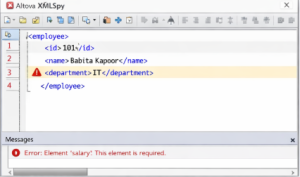
XMLSpy allows you to edit XML files with intelligent auto-completion and syntax highlighting. It validates XML documents against DTD, XSD, or Relax NG schemas.
Use case:
Validating a configuration file before deploying an application.
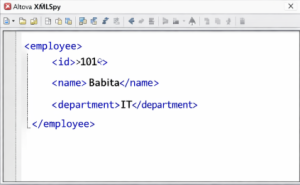
Example XML:
| <employee> <id>101</id> <name>Babita Kapoor</name> <department>IT</department> </employee> |
If the schema requires a <salary> element and it’s missing, XMLSpy will immediately flag the error.
2. XML Schema (XSD) Design
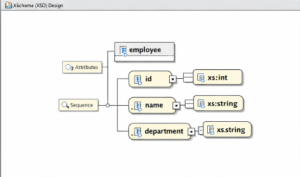
One of XMLSpy’s strongest features is its graphical schema designer. Instead of writing XSD manually, you can visually create elements, attributes, and relationships.
Example XSD snippet:
| <xs:element name=“employee”> <xs:complexType> <xs:sequence> <xs:element name=“id” type=“xs:int”/> <xs:element name=“name” type=“xs:string”/> <xs:element name=“department” type=“xs:string”/> </xs:sequence> </xs:complexType> </xs:element> |
XMLSpy provides a diagram view, making it easier to understand hierarchical structures.
3. XSLT Transformation and Debugging
If you need to transform XML into another format like HTML, XMLSpy includes an XSLT debugger.
Example: Transform XML to HTML
Input XML:
| <employee> <name>Babita</name> </employee> |
XSLT:
| <xsl:template match=“/”> <html> <body> <h1><xsl:value-of select=“employee/name”/></h1> </body> </html> </xsl:template> |
XMLSpy allows you to:
- Set breakpoints
Step through transformations - Inspect variable values
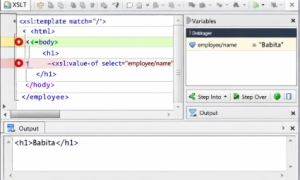
This is extremely helpful in large enterprise transformations.
4. JSON and XML Conversion
Modern systems often require both XML and JSON. XMLSpy supports seamless conversion between the two formats.
Example JSON:
| { “employee”: { “id”: 101, “name”: “Babita”, “department”: “IT” } |
}
With a few clicks, XMLSpy can convert this into a structured XML document.
Advantages of Using XMLSpy
- User-friendly graphical interface
- Real-time validation
- Integrated debugging tools
- Enterprise-level support for XML standards
- Improved productivity for data-heavy applications
Altova XMLSpy is more than just an XML editor — it’s a comprehensive development environment for structured data technologies. From schema design and validation to XSLT debugging and web service testing, it provides everything needed to work efficiently with XML and related formats.


